
Home / The report
The report
The document
you keep.
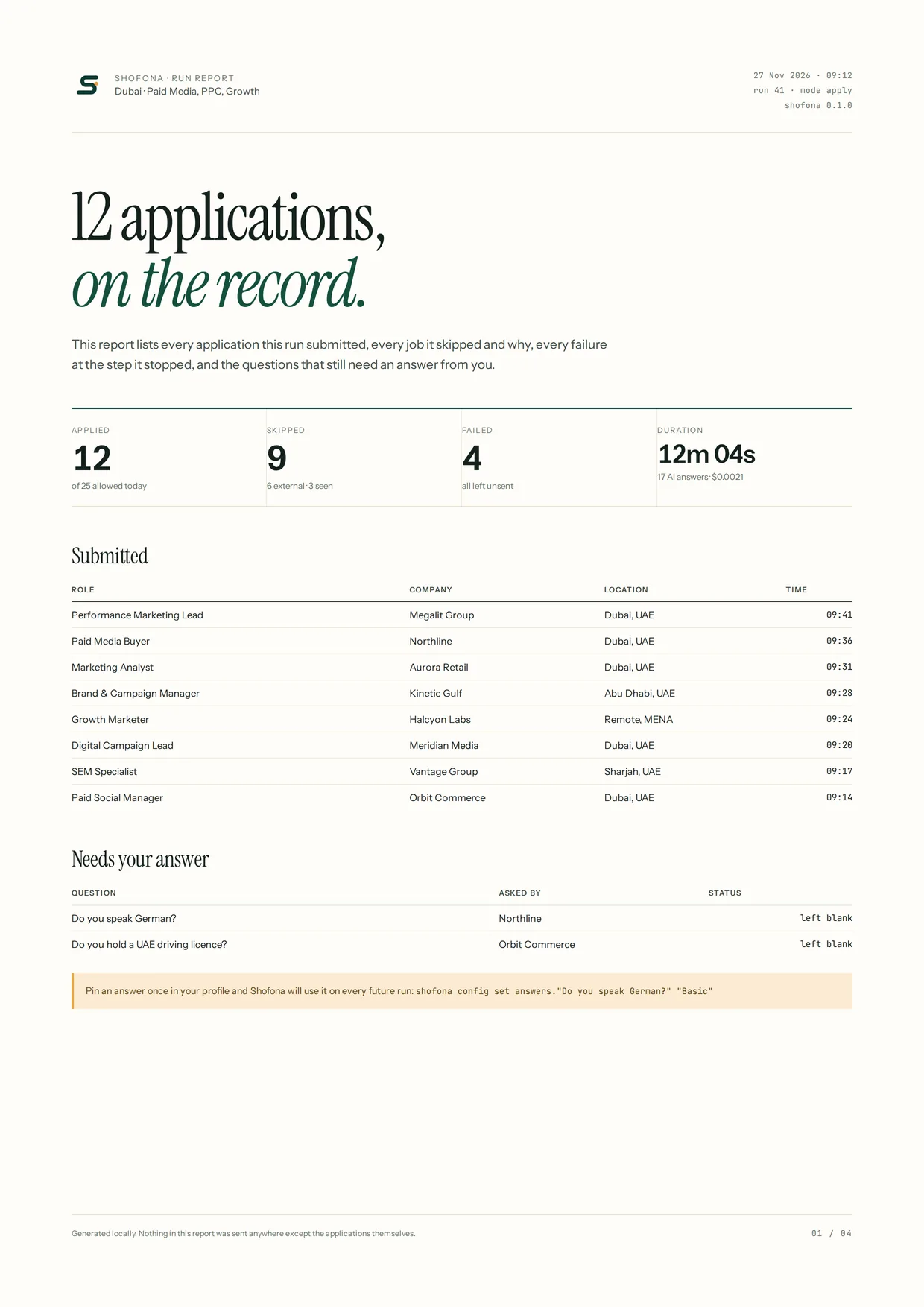
Every run ends with one. It is generated from the run’s own database rows, not from a summary I write afterwards, so it can only report what actually happened.
What is inside
Four sections,
no surprises.
Submitted
Every application that went through, with job title, company, location and the LinkedIn URL.
12 in the sample
Skipped
Every job the run passed over, with the reason: seen before, external site, title on your reject list, missing answer.
9 in the sample
Failed
Every failure with the stage it happened at, whether open, fill or submit, plus the error. No generic red mark.
4 in the sample
Open questions
Every field left blank because no rule matched, phrased exactly as the form asked it.
2 in the sample
Why a document?
A dashboard shows you what the tool wants you to see. A document can be opened next month, searched, attached to a note or sent to someone else.
It also keeps the tool honest. If the report says twelve applications, twelve applications happened. If a step did not finish, the report names the step it stopped at.
A run without a record is just a claim.
Free · Windows 10/11 · v0.1.0
Open a sample report first.
73 MB installerSHA-256 publishedNo accountMIT licence
